
Traffic Public Cloud Platform HTTP API Integration Guide
Integration Implementation Guide for System Integrators: Unify Multi-Vendor Legacy Devices into a Single Cloud Data Gateway by covering device and data boundaries, four prerequisite preparations, authentication and invocation methods, trial runs and acceptance criteria, and key considerations for secondary development.
1Introduction: Three Constraints of Integrated Projects
System integrators often face challenges when deploying store, mall, or scenic spot projects that involve客流 devices from multiple brands within the same scope. To meet delivery deadlines and consolidate data without replacing existing hardware, our Cloud-based Visitor Analytics HTTP API is designed for this scenario. It unifies visitor counts from legacy proprietary devices in the cloud, enabling integrators to build custom applications on their own platforms. Integration is straightforward; success depends on clear boundaries, consistent metrics, and robust joint testing.
2Define boundaries before designing interfaces.
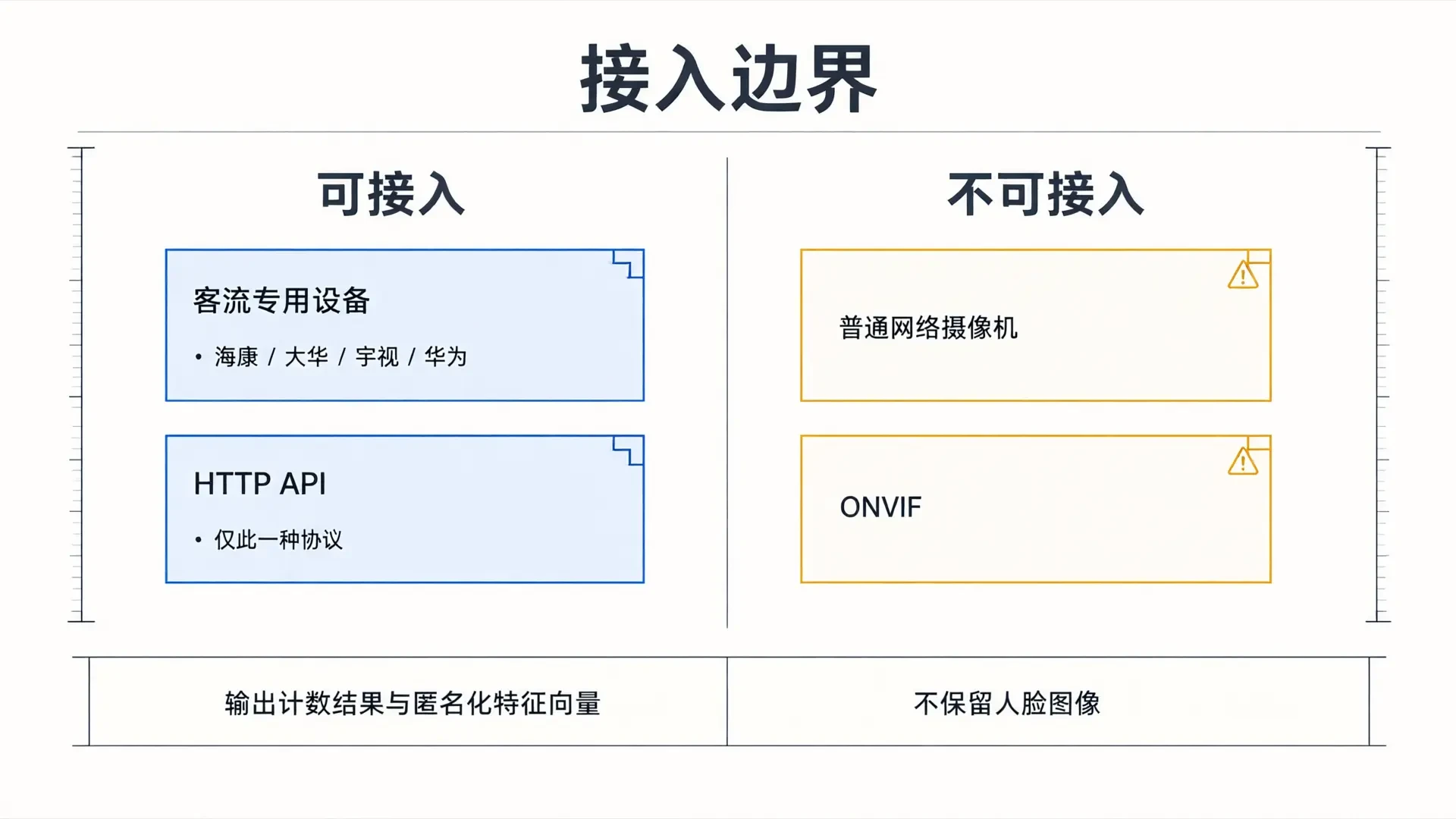
The platform supports only HTTP API integration; it does not support ONVIF or generic video stream ingestion. This must be clarified with the client during the proposal phase. Supported devices are dedicated客流 (passenger flow) counters from major brands including Hikvision, Dahua, Uniview, and Huawei. The compatibility list is continuously updated, and free compatibility testing is provided. Standard IP cameras are not supported as they do not generate客流 counts, and the platform does not extract pedestrian paths from them. On the data side, boundaries are strictly defined: the platform outputs only count results and anonymized feature vectors; no facial images are retained. When drafting requirements, integrators should not assume capabilities such as "retrieving snapshot images" or "uploading a face database." These features do not exist at the API level, and promising them will result in rework during acceptance.
3Four preparations required before integration
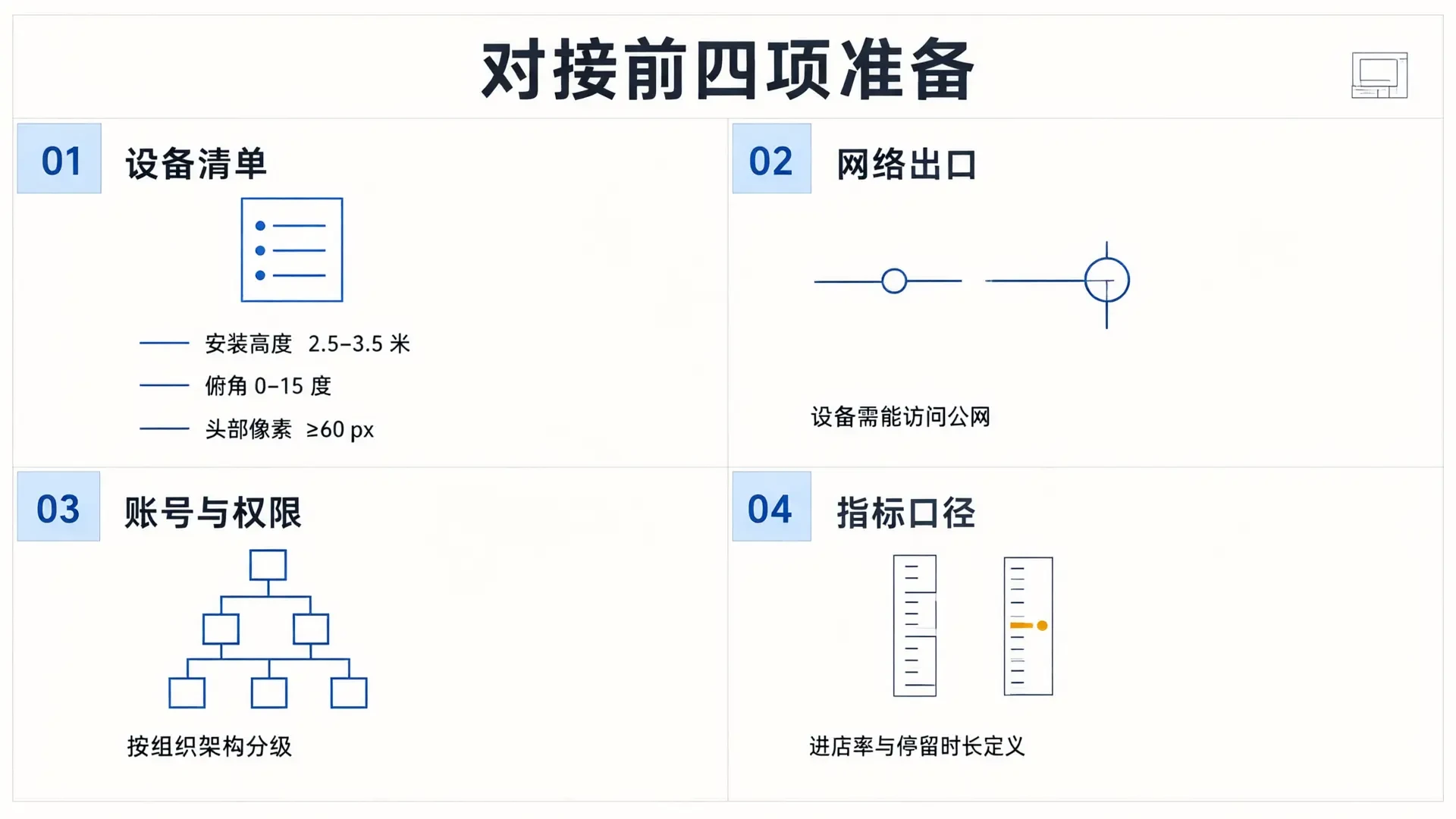
Item 1: Device Inventory. Register each unit's model, firmware version, installation height and tilt angle, and channel count. The platform's stated accuracy assumes an installation height of 2.5 to 3.5 meters, a tilt angle of 0 to 15 degrees, and a minimum head pixel resolution of 60px. If on-site conditions don't meet these specs, data may be unusable even if the interface connection succeeds. Item 2: Network Connectivity. Devices must have access to the public internet or be routed through the client's existing gateway. In many project sites, guest networks are segregated from business networks; ensure port policies are approved in advance so you don't discover connectivity issues on integration day. Item 3: Accounts & Permissions. The platform assigns permissions based on organizational structure; integrators typically receive accounts scoped to the project. Verify which stores and devices the account can access, and whether it can create sub-accounts. This determines whether you'll pull data centrally via a single account or grant separate authorizations per client. Item 4: Metric Definitions. Metrics like store entry rate, dwell time, and passersby count vary by client definition. The API provides raw counts; integrators must handle metric conversions. Agree on definitions upfront to avoid discrepancies during integration testing.
4Authentication, Transmission, and Invocation
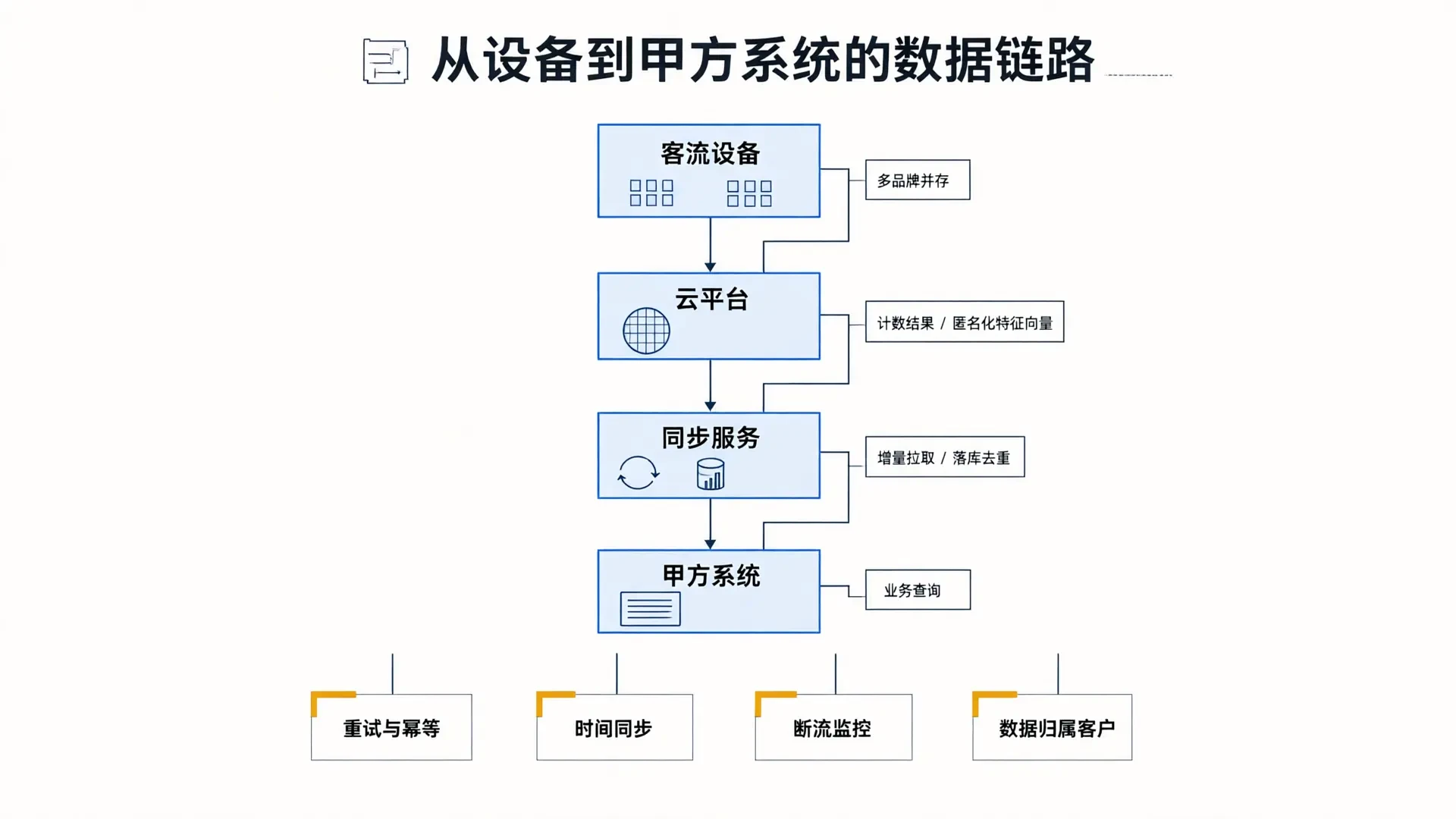
The platform uses API Key authentication with HTTPS encryption. Keys are project-level credentials and must be stored on the server; never embed them in frontend code or distribute them with installation packages. For multi-client deployments, assign unique keys per client and track their usage scope to quickly identify specific projects during abnormal calls. Common integration practice involves a synchronous service that periodically pulls incremental data from the platform, stores it locally, and serves it to the client's system. This approach is necessary because client systems often lack direct internet access. The intermediate buffer prevents network fluctuations from directly impacting business queries. Set sync frequency based on business needs: hourly updates suffice for daily reports, while real-time dashboards should align with device reporting intervals—avoid high-frequency polling of inherently delayed data sources. For specific endpoint paths, request parameters, and response fields, refer to the official developer documentation. Documentation evolves with compatible devices and feature iterations. Integration partners should record the document version number in project technical proposals to ensure field definitions remain traceable after deployment.
5Roadmap from Trial Run to Acceptance
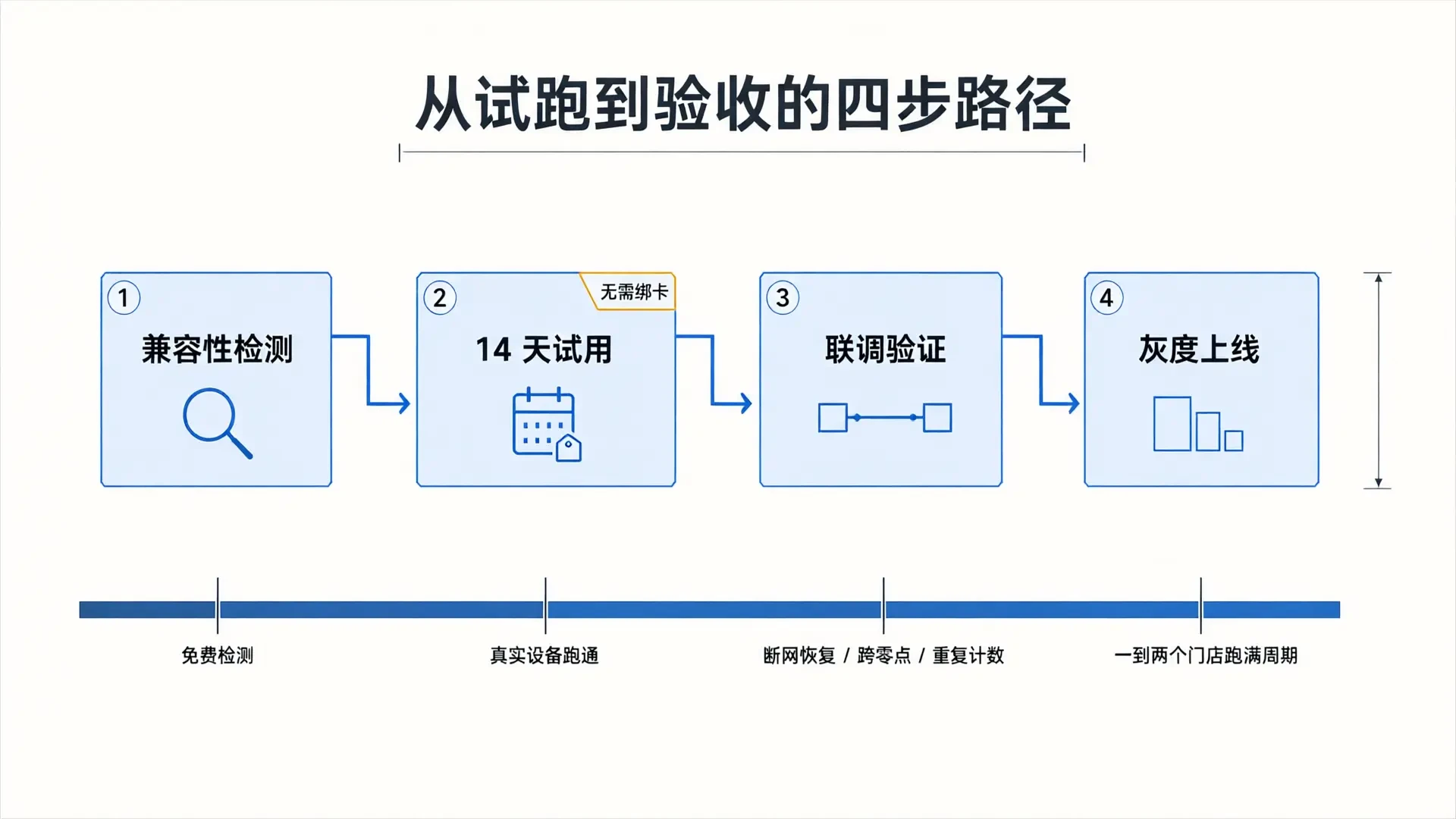
The recommended rollout sequence consists of four steps. First, run a free compatibility check to confirm that on-site devices can connect; this step incurs no cost and helps identify outdated firmware early. Next, start a 14-day free trial using real devices to validate the data pipeline—no credit card is required. The third step is integration testing, focusing on three key areas: whether data remains continuous after network recovery, if time-stamp attribution across midnight is correct, and whether multi-device aggregation avoids duplicate counts. Finally, conduct a limited gray release by selecting one or two stores to run through a full business cycle before rolling out to other locations. This sequence moves risks forward: device compatibility issues are caught in step one at the lowest cost; definition mismatches are identified in step three while there's still time to update documentation; waiting until full launch to discover unexpected data latency from certain device types leaves very little room for adjustment.
6Key Considerations for Secondary Development
Synchronization services must include retry mechanisms and idempotency. Network jitter is common; duplicate data pulls are inevitable. Deduplicate records at write time using business keys rather than checking in-code flags, which is more reliable. Ensure device and server clocks are synchronized. Aggregating foot traffic data by time slices becomes unreliable if device clock drift causes misalignment with the correct time windows, making debugging time-consuming. Include NTP synchronization procedures in the operations manual at project delivery. Monitoring must cover data stream interruptions. The platform should alert on device offline status and sudden spikes or drops in foot traffic. Integration partners should add a secondary layer of monitoring to detect delayed data arrival, creating complementary coverage. Establish notification channels for platform-side events such as key expiration or quota changes. Finally, clarify data ownership: platform data belongs to the customer and must be exportable. During system handover, integration partners must define the party responsible for data export and the export format to ensure clients can access historical data after project completion.
7Conclusion
HTTP API integration has a low technical barrier; delivery quality hinges on preparation and depth of integration. Clearly defining device boundaries, data boundaries, and metric definitions upfront turns the subsequent development into standard interface work. For integrators managing legacy devices while needing a unified data export, this approach saves both hardware replacement costs and schedule time.
Frequently Asked Questions
The platform supports only the HTTP API protocol. It does not use ONVIF or generic video streams for data retrieval. Only dedicated客流 devices with counting capabilities can be integrated; standard network cameras are not supported.
Read more
- Multi-device coverage capability
- Hardware Compatibility and Device Connectivity
- Open API Documentation
- Which protocol is used for cross-brand access of traffic equipment? Unified HTTP API integration.
- How to Identify Traffic Counting Devices: 6 Common Misconceptions Between Dedicated Sensors and General Cameras
- Migration Guide for Hikvision, Dahua, and Uniview Devices to the Passenger Flow Public Cloud: Compatibility and Deployment Cycle Testing
- Request Free Trial
Want to generate value from your existing equipment right now?
14-day free trial, no card required.
Continue reading
How to Choose Between Infrared Beam, Video Analytics, and AI Vision for Foot Traffic Counting
Read moreMyth Busted: Anonymized feature vectors are not facial images; standard cameras cannot capture them.
Read moreTraffic Flow Survey Camera Site Survey Key Points: Installation Angle, Height, and License Plate Pixel Resolution
Read moreUnlock business value from your existing devices.
Fill in your information. A technical consultant will contact you within 1 business days and provide a free device compatibility check.
- 14-day free trial, no credit card required
- Auto-renewal off, 7-day money-back guarantee
- Free Device Compatibility Check