
Migration Guide for Hikvision, Dahua, and Uniview Devices to the Passenger Flow Public Cloud: Compatibility and Deployment Cycle Testing
Leveraging deployment experience from over 3000 enterprise clients, we present a three-layer compatibility validation framework for migrating legacy passenger flow devices from Hikvision, Dahua, and Uniview to public cloud platforms. This includes comparative testing of integrations across the three major brands, a four-phase deployment timeline (7–21 working days), and two key decision criteria for migration planning.
1Three Core Dimensions of Compatibility Testing
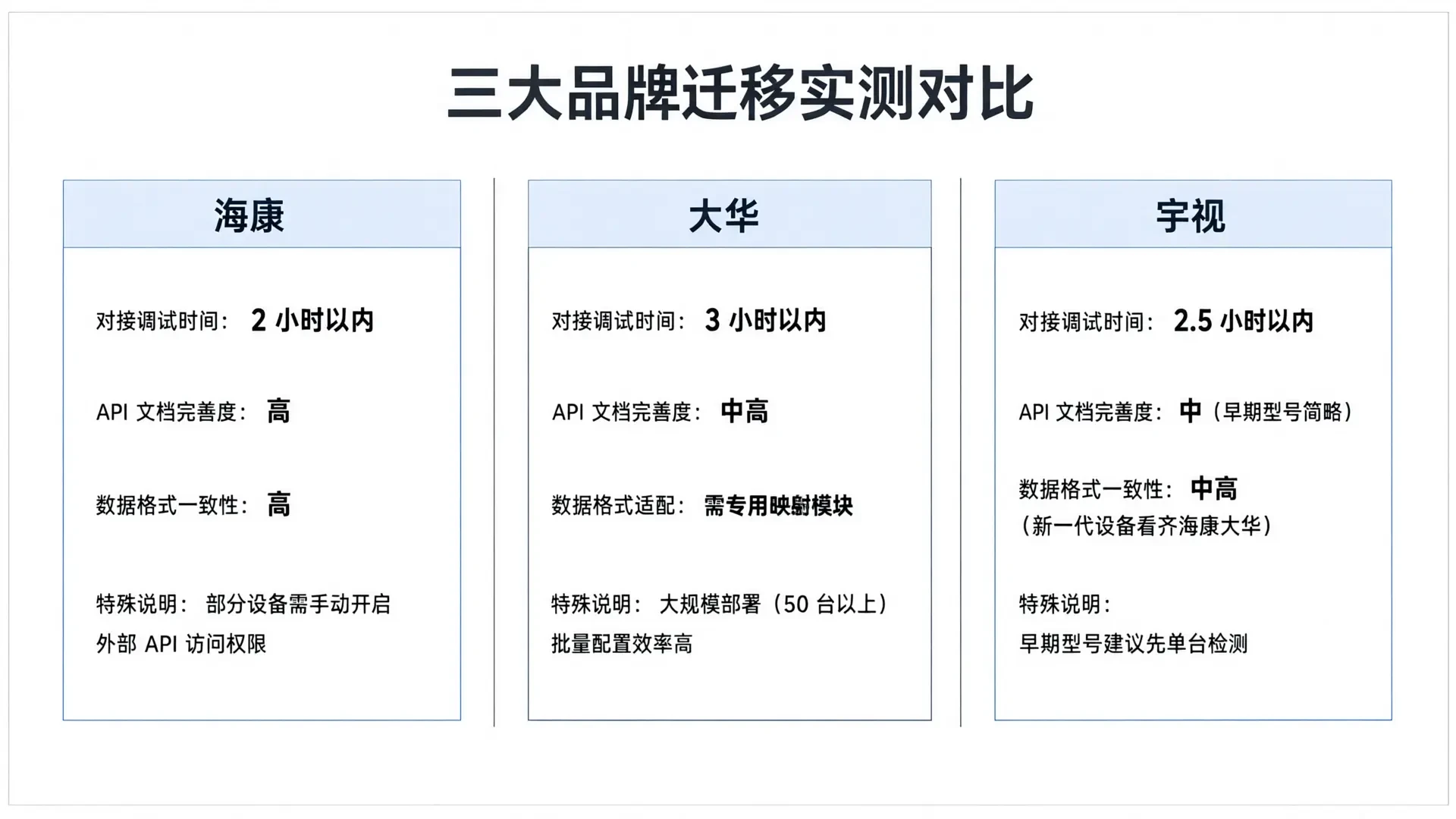
Device compatibility goes beyond a simple "connected" or "disconnected" status. We have established a three-layer validation framework for our real-world projects: 1. **Protocol Integration Layer:** The Crowd Flow Public Cloud Platform connects to devices via direct HTTP API integration, requiring devices to support HTTP protocol output for crowd data. While mainstream crowd flow devices from Hikvision, Dahua, and Uniview all support this protocol, implementation details vary. Some older models require firmware updates to enable full API access. 2. **Data Format Layer:** Crowd flow data output varies across brands in field naming, timestamp formats, and counting logic. For instance, entry/exit direction indicators defined by Hikvision may differ from Dahua's definitions, and Uniview has its own aggregation rules for multi-channel scenarios. Our platform normalizes these formats without altering the original data semantics. 3. **Feature Completeness Layer:** Basic crowd counting functions can typically be migrated directly. However, brand-specific extended features (such as area dwell time statistics and heat map generation) require individual verification. Our compatibility testing service provides a feature mapping report for each device, clearly indicating which features are ready-to-use, which require configuration adjustments, and which are currently unsupported.
2Real-world comparison: migration of three major brands
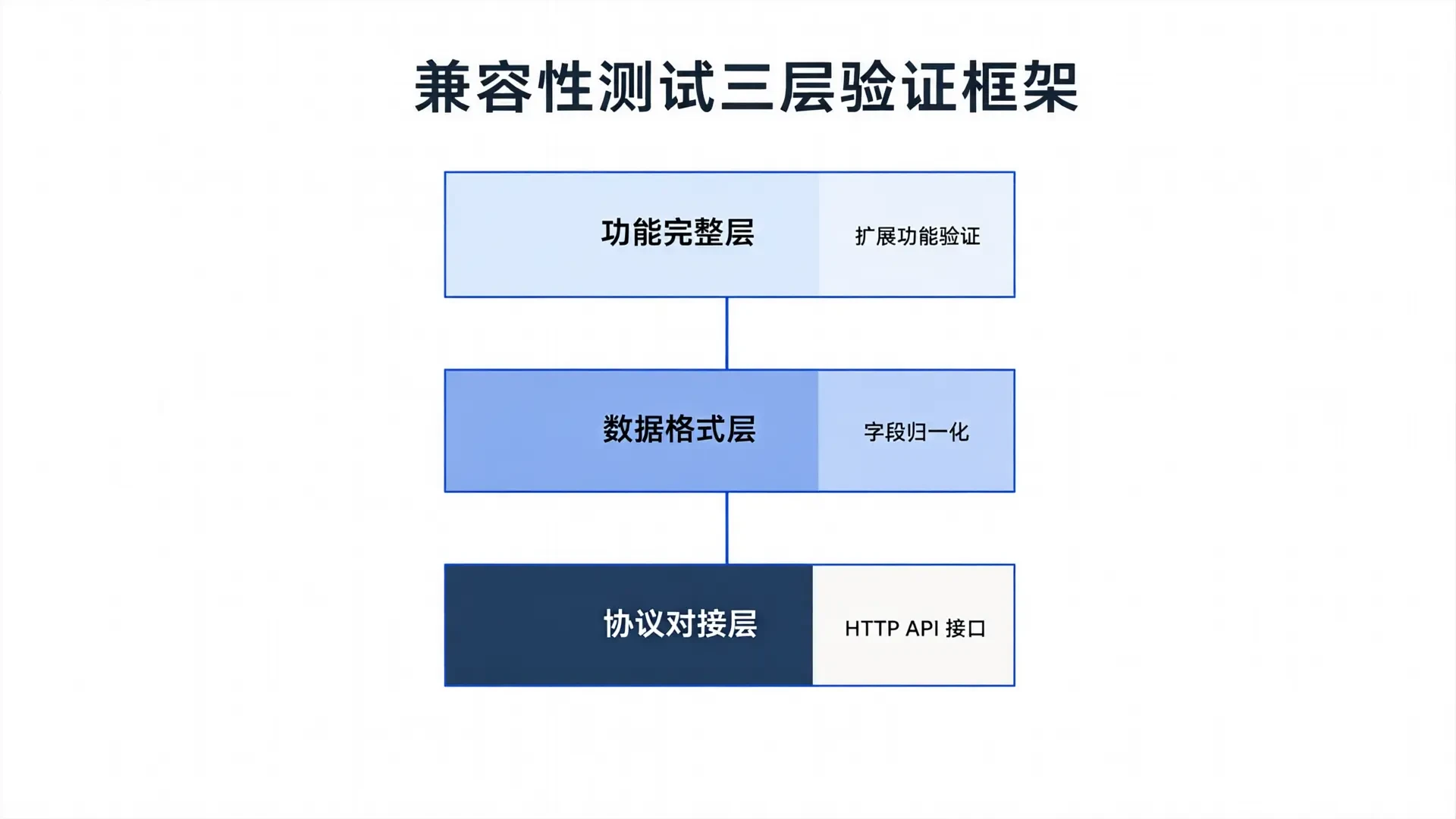
Based on deployment experience from over 3000 enterprise clients, we have systematically analyzed migration characteristics for Hikvision, Dahua, and Uniview. Hikvision devices offer the most stable compatibility: mainstream people-counting models (e.g., DS-ID series) feature comprehensive HTTP API documentation, standardized interface responses, and high data format consistency. Under standard installation conditions, integration and debugging typically take under 2 hour per device. Note that some Hikvision devices disable external API access by default; this must be manually enabled via the device management interface. Dahua devices also provide reliable compatibility but require additional data mapping: while their people-counting APIs (e.g., ASI series) are fully functional, certain field names differ from our platform's default parsing rules. Our engineering team developed a dedicated data mapping module to reduce adaptation time to under 3 hours. Dahua excels in large-scale deployments (50+ units), offering efficient batch configuration capabilities. Uniview's compatibility has improved significantly over the past three years: early-model API documentation was limited, with advanced features requiring direct confirmation with manufacturer support. However, their latest-generation people-counting devices (e.g., IPC series) now match Hikvision and Dahua in interface standardization, reducing integration time to under 2.5 hours. For enterprises using early Uniview models, we recommend testing single-device compatibility first to verify full functionality before proceeding with bulk migration.
3Four Stages of the Deployment Lifecycle
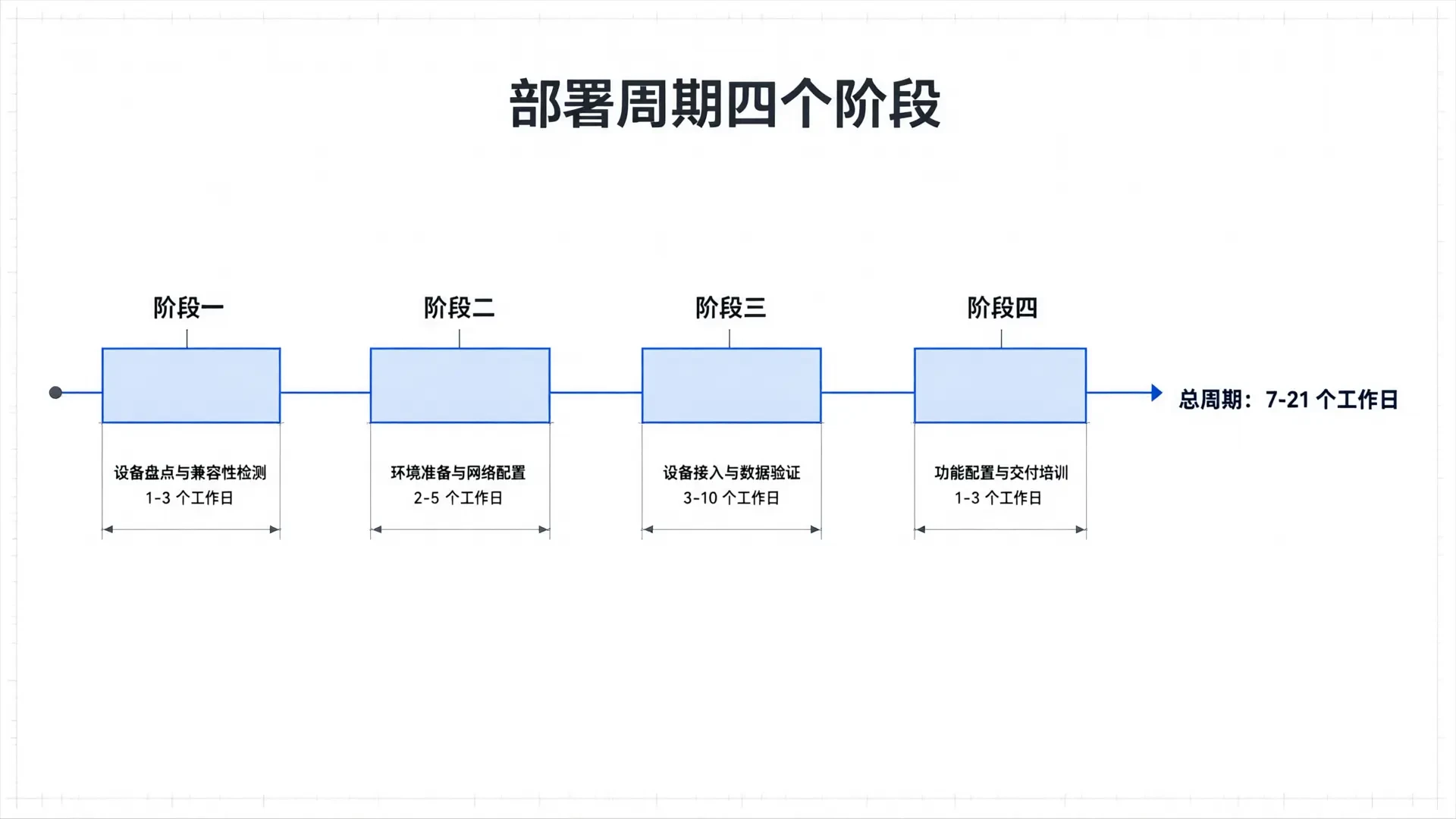
A complete migration project typically spans four phases, with a total duration of 7 to 21 working days, depending on the number of devices and site complexity. Phase 1: Device Inventory and Compatibility Check (1–3 working days) Enterprises must provide a list of existing device brands, models, and firmware versions. Our technical team will verify compatibility item by item and issue a detailed report. This step helps identify devices requiring firmware upgrades or configuration adjustments early on, preventing rework in later phases. Phase 2: Environment Preparation and Network Configuration (2–5 working days) The Crowd Analytics Public Cloud Platform uses a SaaS architecture, so no local server deployment is required. However, network connectivity between devices and the cloud platform must be ensured, including firewall policy updates, API Key authentication setup, and establishment of HTTPS-encrypted transmission channels. For cross-region deployments, network latency impact on real-time data delivery should also be considered. Phase 3: Device Onboarding and Data Validation (3–10 working days) Our engineering team onboard devices in batches and validate data accuracy for each unit. Validation criteria include: counting error rate below 5%, data upload latency under 30 seconds, and proper triggering of offline device alerts. Workload scales with device count; projects with up to 100 devices are typically completed within 5 working days. Phase 4: Feature Configuration and Delivery Training (1–3 working days) The platform supports AI-powered report generation via natural language queries, allowing users to retrieve crowd analytics data and generate visual reports effortlessly. Our technical consultants will configure intelligent alert rules and shift scheduling models tailored to your business scenarios and provide comprehensive operational training.
4Two Key Criteria for Migration Decisions
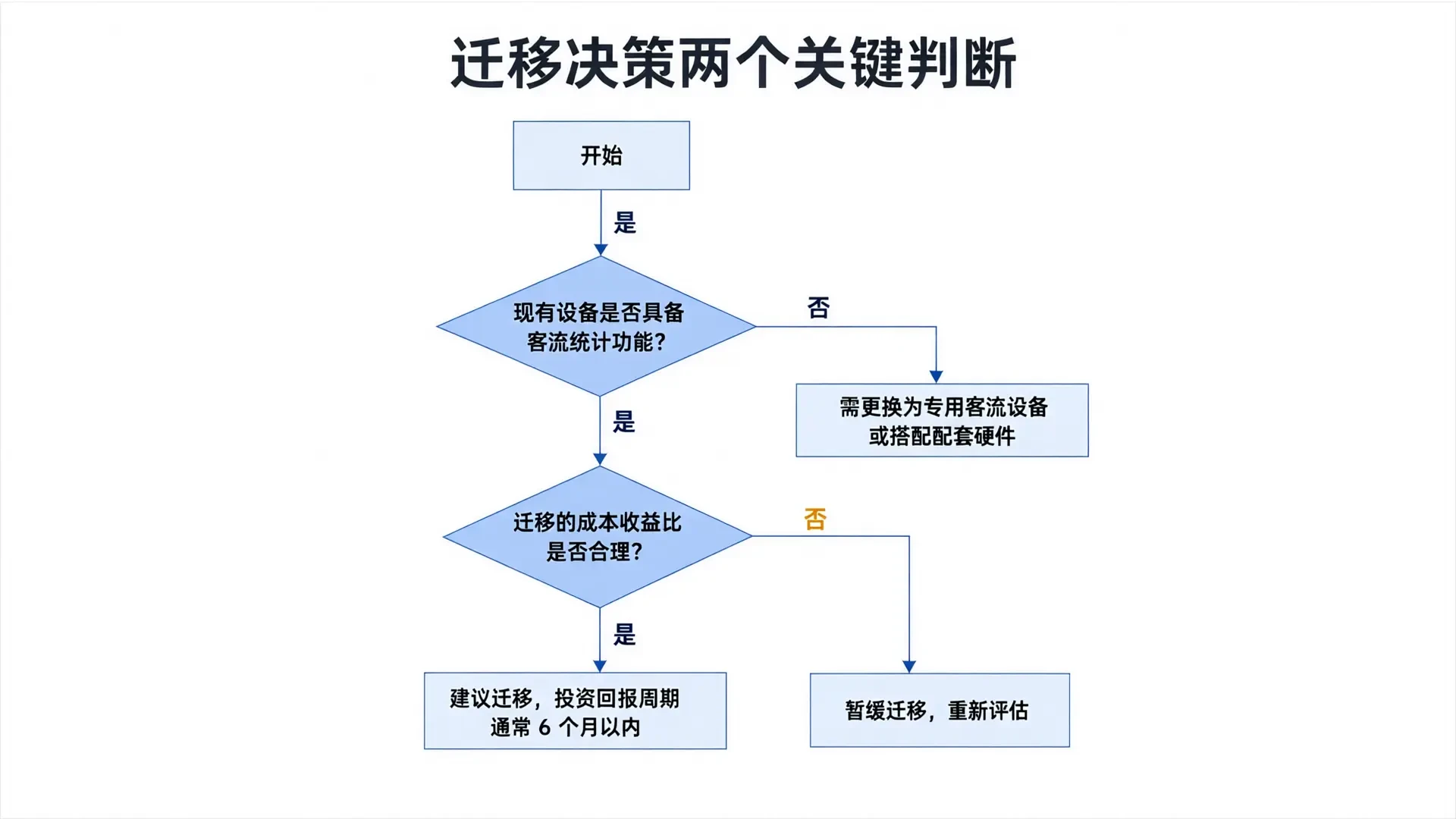
When making migration decisions, enterprises must answer two questions. First: Do existing devices support people counting? The People Counting Public Cloud Platform only accepts dedicated devices with this capability; standard network cameras are not supported. If current equipment consists of ordinary surveillance cameras, they must be replaced with dedicated people-counting devices or paired with compatible hardware. Second: Is the cost-benefit ratio reasonable? Direct migration costs include platform subscription fees (from 1200 CNY/year for the paid version, billed annually per store) and one-time deployment service fees. Indirect benefits include optimized business decision-making via AI analytics, improved management efficiency through multi-device collaboration, and reduced IT operations costs enabled by the SaaS model. For enterprises with more than 10 existing devices, the investment payback period is typically under 6 months. The People Counting Public Cloud Platform has passed cybersecurity assessments by public security authorities. Its core software holds copyright registration, data transmission and storage are fully encrypted, and only count results and anonymized feature vectors are output—no identifiable facial images are retained. The platform offers a 14-day free trial (no credit card required) and complimentary device compatibility testing, allowing companies to complete technical validation before deciding to migrate.
Frequently Asked Questions
In testing, under standard installation conditions, a single Hikvision mainstream traffic device typically requires less than 2 hours for integration and debugging. Dahua devices take approximately 3 hours, while the latest Uniview models require around 2.5 hours. Actual time may vary based on firmware version and network environment; we recommend performing a compatibility check first.
Read more
- Competitor Migration and Device Access Guide
- Hardware Compatibility and Device Connectivity
- Which protocol is used for cross-brand access of traffic equipment? Unified HTTP API integration.
- Implementation Path for Migrating Existing Hikvision and Dahua Devices to the Passenger Flow Public Cloud Platform
- Site Survey Checklist: Four-Phase Verification from Environment Assessment to Delivery Acceptance
- Traffic and Vehicle Flow Project Case Library
- Request Free Trial
Want to generate value from your existing equipment right now?
14-day free trial, no card required.
Continue reading
Implementation Path for Migrating Existing Hikvision and Dahua Devices to the Passenger Flow Public Cloud Platform
Read moreHow to Connect Hikvision People Counting Cameras to Third-Party Platforms: Complete Step-by-Step Guide
Read moreDahua Traffic Device Integration Guide: Key Points for IPC-HFW Series Access
Read moreUnlock business value from your existing devices.
Fill in your information. A technical consultant will contact you within 1 business days and provide a free device compatibility check.
- 14-day free trial, no credit card required
- Auto-renewal off, 7-day money-back guarantee
- Free Device Compatibility Check